
CT Partners Affiliate Program
Five documented RevShare levels from 30% to 80%, negotiated CPA and Hybrid offers, partner reporting and real CT-Aff account evidence.
Affiliate links may earn Rating Broker a commission. Your assigned agreement controls rates, attribution, payment and permitted traffic.
Partner commission information is separate from a retail trading account. The sections below cover commercial rates, campaign tracking, payment arrangements and registration.
CT Partners: Affiliate Program for ComforTrade
CT Partners is the partner program connected with the ComforTrade trading platform. It provides an affiliate workspace for generating campaign links, monitoring referred users and viewing commission information. The program is sometimes identified by the name CT-Aff because that is the name used for the partner platform.
The program connects two distinct audiences. People looking to use the ComforTrade terminal need a trading account; publishers interested in commissions require a CT Partners affiliate account. Once an affiliate application has been accepted, the partner can use the dashboard to arrange campaigns and follow their performance.
The central commercial feature is the Revenue Share ladder, which ranges from 30% to 80% depending on First Time Depositors (FTDs) during a defined calculation period. CT Partners also provides CPA and Hybrid arrangements for qualifying partners, with terms tailored to the acquisition source and campaign conditions.
CT Partners Revenue Share: Five Commission Levels
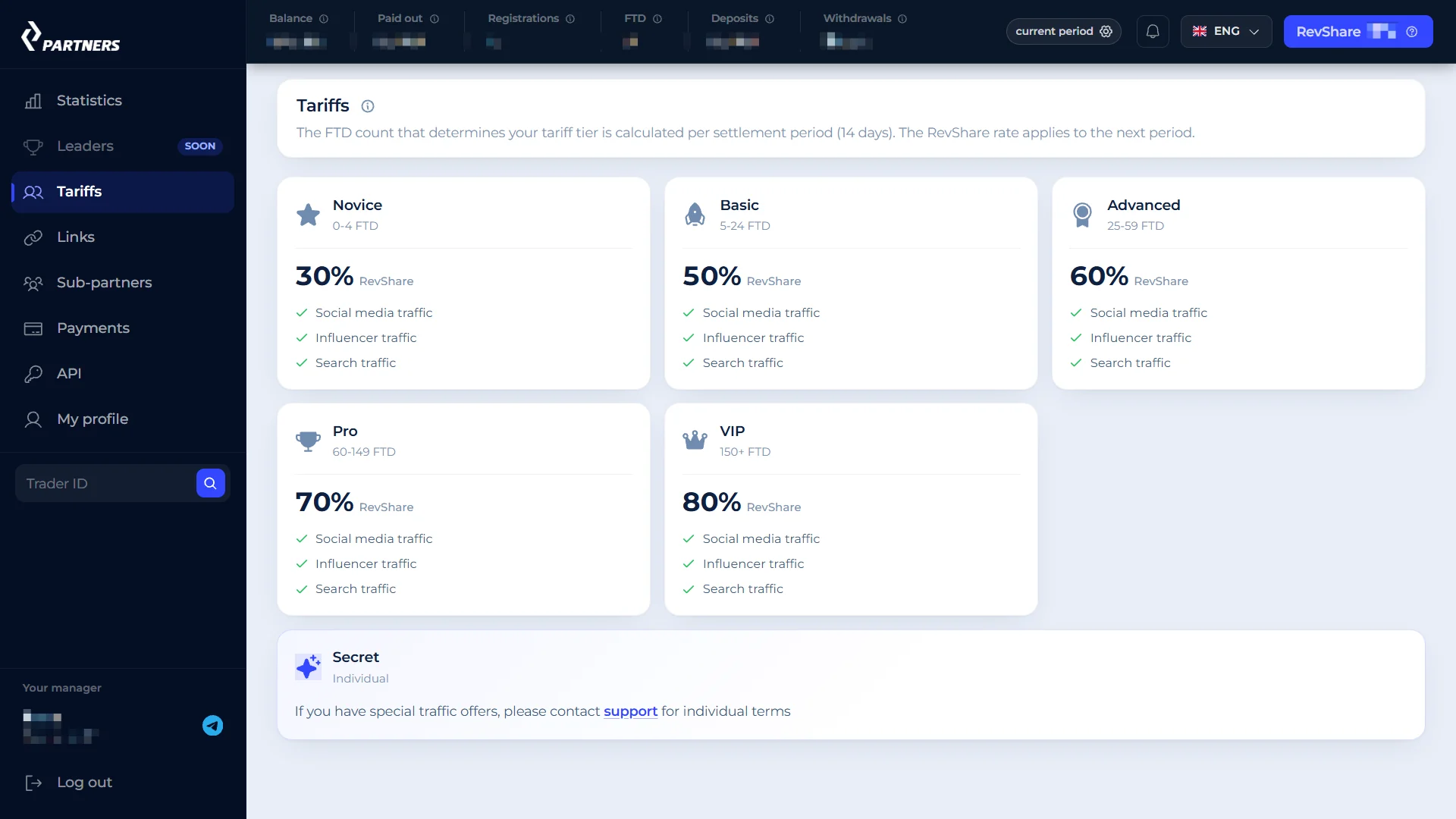
The Revenue Share system is organized around the number of qualifying first depositors attributed to a partner. The account dashboard checked in September 2026 displayed five tariff bands, beginning at 30% for up to four FTDs and reaching 80% once the qualifying count reaches 150 or more.
| Tier | FTDs per 14-day period | Revenue Share |
|---|---|---|
| Newcomer | 0–4 | 30% |
| Basic | 5–24 | 50% |
| Advanced | 25–59 | 60% |
| Pro | 60–149 | 70% |
| VIP | 150 or more | 80% |
Tariff bands transcribed from a genuine CT Partners partner dashboard screenshot captured in September 2026. The program's applicable agreement controls the exact rate and calculation.
The tariff interface states that FTDs are counted during a 14-day reporting period and that the resulting Revenue Share rate is applied to the following period. Consequently, a campaign reaching a higher FTD tier during one period should not automatically expect its updated percentage to apply retroactively to the same period.
In everyday use, the publisher can identify the current level in the Tariffs area and view the registrations and FTD numbers in the Statistics area. This makes the tier structure meaningful: it is tied to qualifying activity, rather than an unqualified percentage offered to everyone upon sign-up.
 Original evidence hosted at ComforTrade.co · open screenshot ↗
How CT Partners Counts FTDs and Applies Tiers
An FTD is a referred user who completes a qualifying first deposit under the offer rules. In the CT Partners tariff structure, FTD volume determines which of the five Revenue Share bands applies to the next reporting period. A visit, click or registration by itself is not a first deposit.
For example, a campaign that records 18 eligible FTDs in a 14-day period falls within the Basic band displayed in the dashboard; 65 eligible FTDs correspond to the Pro band. These are examples of how the published thresholds work, not forecasts of a publisher's future conversions.
Commission amounts are separate from FTD counts. The dashboard may display deposits, withdrawals, trading results and a commission balance alongside acquisition statistics. The Revenue Share percentage applies to the program's defined revenue calculation, not to the entire sum deposited by users. For accurate bookkeeping, distinguish the rate, the revenue base and the amount currently payable.
Individual agreements can include special conditions. When a manager assigns a private offer, the commission formula and its eligibility conditions should be visible in the approved terms or confirmed through the partner workspace before the campaign starts.
CT Partners CPA and Hybrid Affiliate Offers
In addition to Revenue Share, CT Partners supports CPA and Hybrid collaboration. Under CPA, the partner earns an agreed fixed fee when a referred user completes the required qualifying event. The actual amount depends on the approved offer, target geography, acquisition channel and the quality requirements assigned to that campaign.
Hybrid combines a fixed acquisition component with a continuing Revenue Share component. This allows a campaign to use two different reward mechanisms instead of relying on one. The division between the two components is not a fixed public tariff: the individual offer sets the relevant percentages, acquisition requirements and payment rules.
| Model | How it is structured | Main condition |
|---|---|---|
| Revenue Share | A percentage of the defined program revenue | Partner tier and reporting period |
| CPA | A negotiated amount per qualifying acquisition | Approved event and GEO |
| Hybrid | A negotiated CPA component plus Revenue Share | Individually approved mix |
Partner managers can clarify whether a given traffic source is suitable for one model or another. A content publisher bringing long-term recurring visitors may use a different arrangement from a media-buying team optimizing a limited campaign budget. The right model is the one actually approved for that affiliate account.
Apply for a partner account to view the current offers and arrange Revenue Share, CPA or Hybrid terms.
CT-Aff Dashboard: Campaign Statistics and Performance
The CT Partners dashboard includes separate areas for Statistics, Leaders, Tariffs, Links, Sub-partners, Payouts and API access. This is useful for managing the full affiliate workflow from a single account: setting up a link, distinguishing the origin of a visitor and checking which actions have resulted in credited commission.
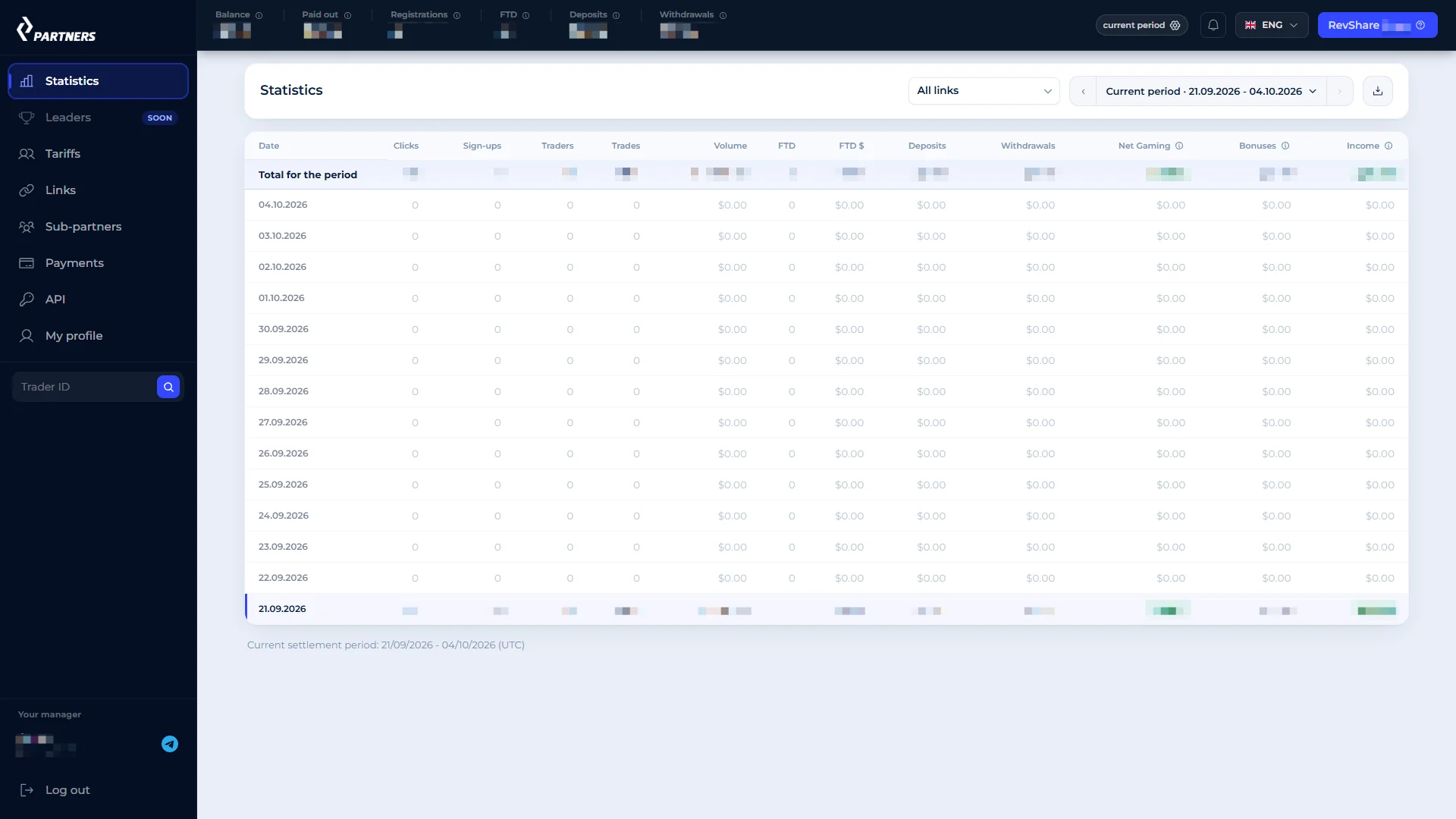
The Statistics screen seen in the September 2026 account contains grouped measurements for clicks, registrations, first deposits and financial activity. The numbers relate to the selected date range and filters, so the reporting period should always be checked before comparing one acquisition channel with another.
A workable campaign reporting routine is to select a date range, filter by source or referral link, inspect the conversion steps and compare the attributed commission. Clicks, registrations and FTDs are distinct stages. Reviewing each stage separately helps identify where a campaign needs a different landing page or clearer explanation of the product.
Activity by selected date, campaign and conversion stage.
FTD thresholds and the applicable Revenue Share tier.
Referral destinations and placement-level campaign identifiers.
Balance and payment history in the partner workspace.
The CT Partners workspace organizes tariff levels, attributed campaign activity and payout information into dedicated sections. The affiliate can move between them while keeping campaign and payment data in one account.
 Original evidence hosted at ComforTrade.co · open screenshot ↗
Affiliate Links, SubID and Postback in CT Partners
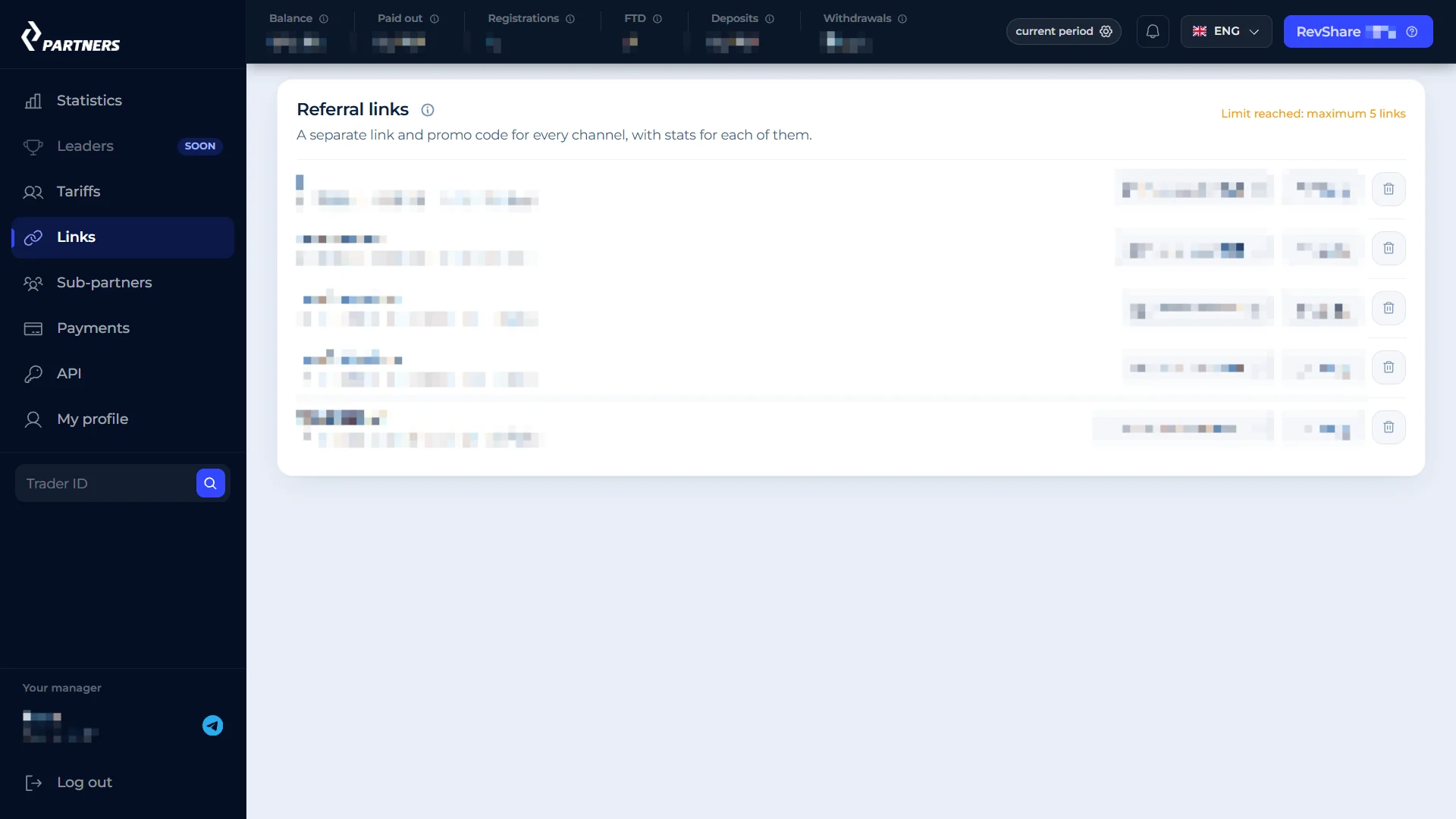
CT Partners enables publishers to create tracked destinations for an approved offer. A campaign link attributes visitor activity to the relevant affiliate account. SubID is a way to distinguish one placement or traffic source from another within the tracking system. The precise parameter format should be taken from the link generator inside the authenticated workspace.
For example, a publisher can separate a homepage placement from a dedicated broker information page or distinguish organic traffic from a social campaign. Assigning a consistent identifier to each placement makes it easier to interpret the report after a few days without needing to remember when every link was added.
Postback and API functions are intended for teams that want to match attributed events with their external reporting systems. A registration and a qualifying deposit can have different event definitions, so the postback configuration must use the event names that the program actually supports. These are practical tracking features rather than promises of any particular conversion rate.
Inside Rating Broker, the ComforTrade broker profile describes the trading product and account access for users. This CT Partners page serves publishers who are interested in tracking and commissions. The affiliate-program directory lists other programs for a broader comparison of partner terms.
 Original evidence hosted at ComforTrade.co · open screenshot ↗
Traffic Sources and Promotional Tools for CT Partners
CT Partners has described promotional activity across search publishing, contextual advertising, social media, Telegram, video and email. The Tariffs screen also names social, influencer and search traffic as recognizable channel types. Publishers can therefore plan channel-specific placements rather than treating every source as an identical stream of visitors.
Organic content can use a relevant article or product page to explain the ComforTrade interface before referring a visitor to the trading platform. A specialist page about an affiliate program should instead address commission models and webmaster tools. Matching content to visitor intent generally creates a more coherent path through the site.
For teams running multiple channels, separate tracking links and descriptive SubIDs make reporting clearer. Promotional materials such as banners, landing pages and pre-landing assets can be selected according to the intended channel when provided in the partner workspace.
Brand-name advertising, a specific country or a particular creative format may have its own permission rules. Affiliates should use the campaign terms approved by CT Partners rather than assuming that every conceivable search advert or media buy is permitted by default.
CT Partners Sub-Affiliate Program
Alongside commissions on referred traders, CT Partners describes a sub-partner mechanism. The original account documentation records an advertised share of up to 5% of commissions earned by invited affiliates. This is a different referral relationship from attracting individual traders to ComforTrade.
The Sub-partners section of the dashboard allows an affiliate to keep the two processes separate: direct product referrals on one side, recruited webmasters on the other. For publishers running a network of related sites or working with other traffic teams, this provides a way to organize collaboration within the partner platform.
The percentage is a program-defined sub-affiliate term, not a share of every trader's deposit. Check the rate assigned to your specific sub-partner relationship and any exclusions in the approved account terms before estimating the resulting income.
CT Partners Payouts: $50 Minimum and 14-Day Cycle
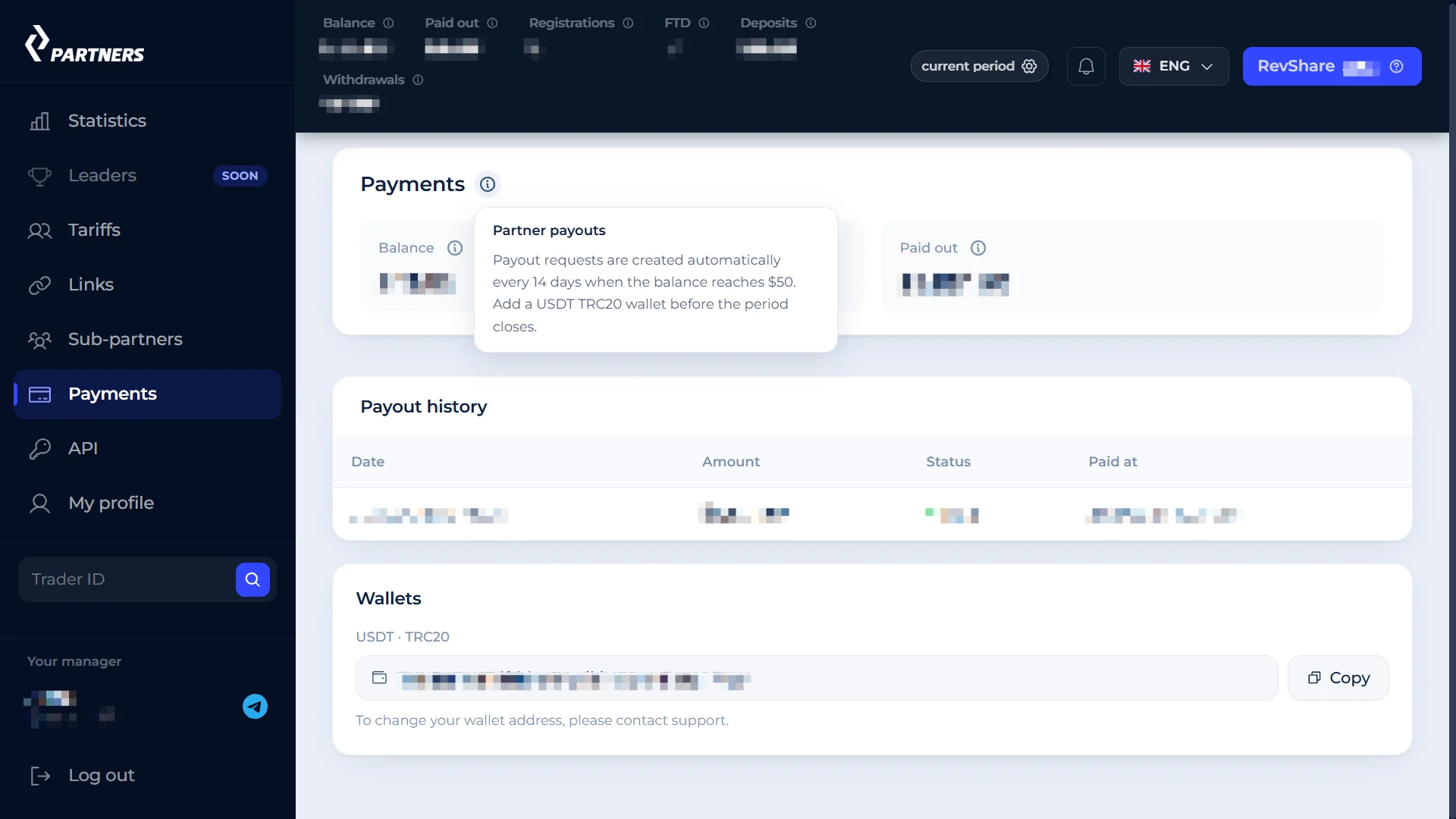
The partner-account payout screen previously checked for this project stated a $50 minimum payable balance and automatic payment processing every 14 days. The documented payout route was USDT on TRC20. These details came from the affiliate workspace as checked on 9 September 2026, rather than from a generic public-facing promotional claim.
Before a scheduled cycle, the account holder provides the wallet details and checks whether the available balance meets the threshold. Where the automatic rules apply, there is no need to submit a manual request for each regular payout. The dashboard should be used to view the current balance, pending items and previous transfers.
When using USDT TRC20, confirm the supported blockchain network before copying the receiving address. Crypto-wallet details must match the payment route shown in the account. A payout schedule also describes when the program creates or releases eligible transfers; it is different from the time needed for a commission event to appear in the balance.
The published payout conditions in a current account may differ if an affiliate is working under an individually negotiated agreement. The account's active payment page remains the operational place to check its settings.
Review your assigned tariff, eligible commission balance and automatic payment details.
 Original evidence hosted at ComforTrade.co · open screenshot ↗
CT Partners Registration and Account Setup
Starting with CT Partners involves creating a webmaster profile rather than a ComforTrade trading account. The affiliate application asks for contact information and information about the traffic source, the planned promotion and intended target markets. Approval allows access to the partner dashboard and the offers made available to that account.
Use the CT Partners affiliate route to begin the application.
Specify your main acquisition channel, audience and target locations.
Review the assigned commission model and qualifying actions.
Create separate placements and record the campaign identifiers.
After registration, sign-in takes the affiliate back to the same partner workspace. Campaign links can be added to relevant publishing placements after the offer and destination have been checked. A publisher working with ComforTrade content can learn more about the product on the dedicated ComforTrade trading broker website.
For clarity, keep affiliate campaign details separate from a trader's account credentials. The affiliate workspace manages commission attribution and payouts; the trading terminal has a different purpose and login flow.
From a Campaign Link to an Affiliate Payout
The practical flow begins with an accepted affiliate profile and a live offer. The partner generates a tracked link, places it in a suitable promotional context and monitors visitors in the Statistics area. Registrations may appear before a funded customer is counted as an FTD, and both occur before any eligible commission is recorded.
At the end of the 14-day reporting period, the tariff interface determines the Revenue Share tier according to the FTD result. The partner then reviews the commission data and, when the available payment balance meets the required threshold, the payout settings govern the transfer to the nominated wallet.
Publishers can keep a simple record of when campaigns were launched, which landing destination was used and which SubID identifies each placement. Consistent reporting prevents confusion between a source that attracts visits and a source that produces first deposits. The dashboard already brings the relevant steps into a single place.
For teams with higher acquisition volume, the API and Postback sections can connect events to an external reporting workflow. For smaller publishers, the standard dashboard tables and exported reports may already provide enough information to operate a focused content campaign.
CT Partners Affiliate Program FAQ
What is CT Partners?
CT Partners is the affiliate program connected with ComforTrade. It provides campaign links, performance reporting and commission arrangements for publishers and traffic partners.
What are the CT Partners Revenue Share levels?
The September 2026 partner dashboard showed 30%, 50%, 60%, 70% and 80% Revenue Share tiers, based on eligible first depositors in a 14-day reporting period.
Does CT Partners offer CPA and Hybrid deals?
Yes. CPA and Hybrid terms are individually assigned according to the accepted offer, target markets, traffic source and qualifying events.
How does CT Partners determine the next Revenue Share tier?
The dashboard tariff description bases the next period's rate on qualifying FTDs recorded during the current 14-day reporting cycle.
What is the minimum CT Partners payout?
The affiliate account checked on 9 September 2026 displayed a $50 threshold, automatic payment every 14 days and USDT TRC20 as its payment route.
Can I track different CT Partners traffic sources?
The partner workspace includes link management and statistics. Use separate campaign identifiers or SubIDs, according to the available tracking tools, to distinguish placements.
Does CT Partners have a sub-affiliate feature?
The program documentation describes an additional sub-partner model with up to 5% of qualifying recruited affiliates' commissions, subject to the assigned agreement.
Is a CT Partners account the same as a ComforTrade trading account?
No. CT Partners is for webmasters and affiliate campaigns; the separate ComforTrade broker account is for using the trading terminal.
Explore CT Partners Registration and Commission Terms
Check the current tariff, tracking tools and payout setup directly inside your partner account. Published maximums and historic account screenshots are not universal contractual guarantees.
Open CT Partners registration ↗Compare all programs →