
BinoDex Trading Platform: Demo, Futures & AI Tools
Find BinoDex official site access and sign-up guidance, try the observed $10,000 virtual demo and explore Digital Options, Futures, AI Trading and Copy Trading. Independent platform directory; affiliate buttons lead to the account route.
Open an account, try the demo, then choose a product
BinoDex offers an expiry-based Digital Options ticket and a separate perpetual Futures workspace. Start by checking account access and selecting virtual demo funds. AI Trading and Copy Trading are additional account tools with distinct risks.
Registration and login steps ↘- 01Sign up or log in
Choose email, Google or wallet access where available.
- 02Use the demo first
Our September test recorded $10,000 in virtual balance.
- 03Check the product and cashier
Digital Options differs from Futures; payment limits are network-specific.
BinoDex Trading Platform: Digital Options and Futures
BinoDex brings two distinct trading products together in its account interface. In Digital Options, you choose an asset, stake, expiry and direction, then review the displayed payout. In perpetual Futures, an open position uses margin, leverage, liquidation and funding controls rather than a fixed expiry.
This independent account guide focuses on opening access, trying the demo, locating the two workspaces and checking funding conditions. The dated screenshots below come from actual account checks in September 2026. They establish what appeared in those sessions—not what every user will see indefinitely.
BinoDex Digital Options: Amount, Expiry and Payout
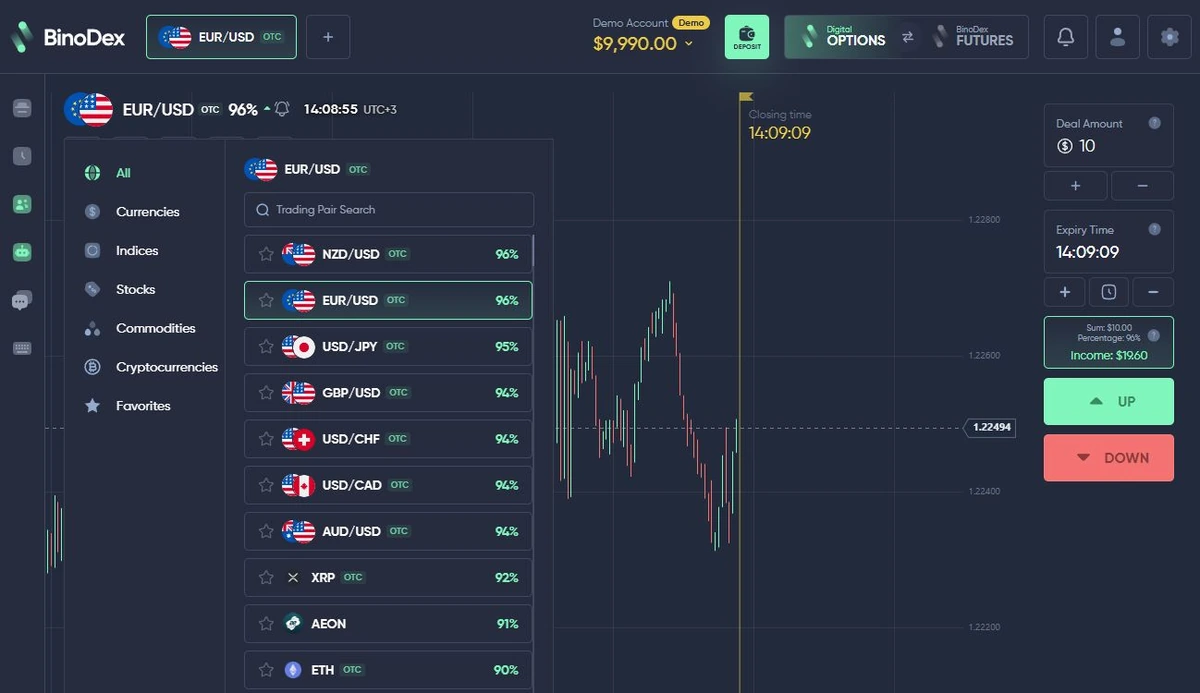
The tested Digital Options screen has an asset list, chart, deal amount, expiry field, active payout and Up/Down buttons. The sequence is to select an instrument, read the current payout, set the amount and expiry, and submit the direction. A completed demo contract is then recorded in trade history.
In the September test the expiry selector offered 15 and 30 seconds; 1, 2, 3, 4, 5, 15 and 30 minutes; and 1 hour. Chart tools included timeframes, indicators and drawing controls. These are recorded interface choices, not guarantees that each asset continues to allow every duration.
BinoDex public materials advertise Digital Options trading from $1. That is a promoted starting trade size, not a verified universal minimum for every real-money ticket. Review the limit displayed in the account before placing any order. An options payout percentage is not Futures leverage or a promise of successful trades.
Assets, OTC Markets and Displayed Payouts
BinoDex shows a range of instruments in the Digital Options asset selector, including OTC entries. Available instruments and the percentage displayed next to each asset can vary with the selected market and trading session.
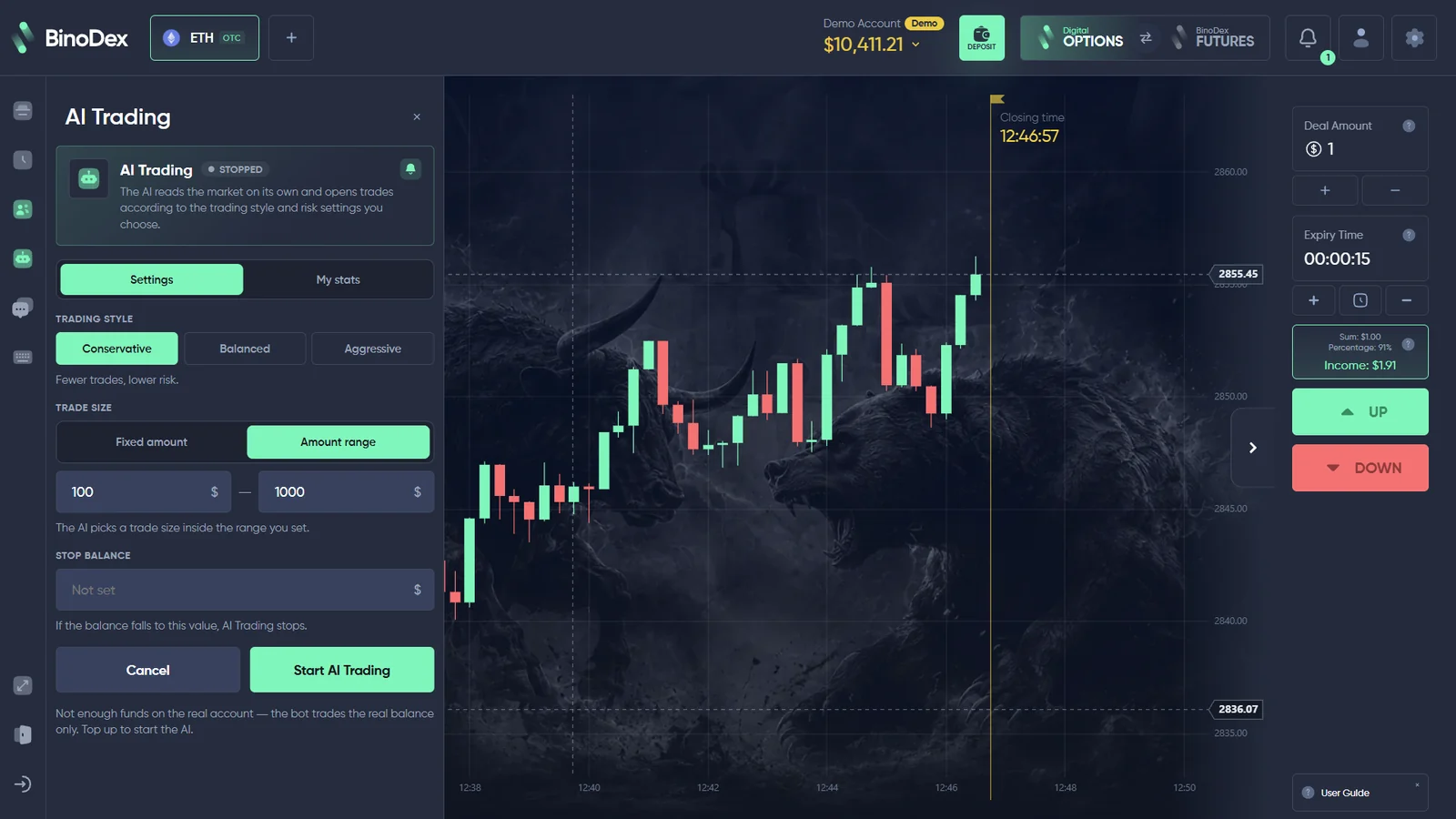
The September 2026 demo record included an ETH OTC example with an 88% displayed profit payout; another asset screen showed 96%. These figures describe the screens captured at that time, not a single fixed rate for every instrument.
BinoDex Demo Account: $10,000 Virtual Balance and Trade History
Our September 4 BinoDex account check began with a $10,000 virtual demo balance. A $10 EUR/USD OTC demo trade was placed and the completed loss appeared in history; the balance moved to $9,990. The evidence shows that the demo workflow can open and settle an order, not that a funded account will perform the same way.
A later September session separately documented an ETH OTC demo contract with a displayed 88% payout. Those records describe different observations, so the demo value, trade amount and instrument should not be treated as permanent defaults.
How to try the BinoDex demo
Open the account flow, follow the supported access method and select the Demo balance before opening a contract. Inspect the selected asset, expiry and payout, then check the resulting entry in History. Our verified session took place in a logged-in account; we do not promise an unregistered guest mode.
The demo uses virtual funds and requires no real-money deposit for the practice trades described here. It cannot establish withdrawal speeds or real-money settlement.
For a more detailed platform-tested walkthrough, see the BinoDex Digital Options demo test on our separate project.
BinoDex Futures: Long/Short, Margin and Risk Controls
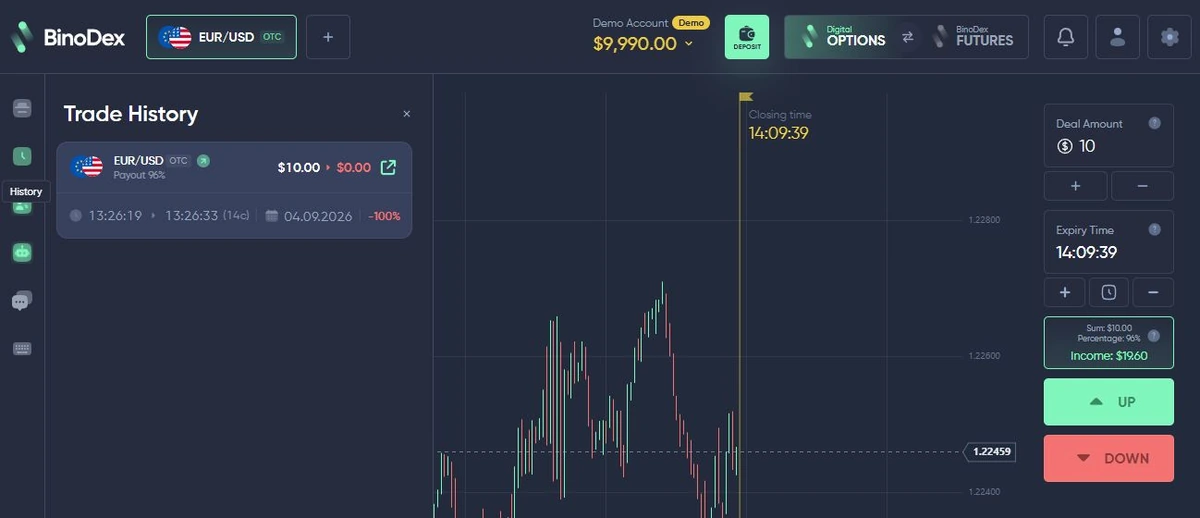
BinoDex Futures is a separate workspace, not merely a different expiry setting. Our captured ETHUSDT terminal exposed Market and Limit tabs, Buy/Long and Sell/Short directions, Cross and Isolated margin choices, Take Profit/Stop Loss fields, liquidation estimates and account-position information.
The leverage selector observed in the account reached 150×. Higher figures appearing in marketing are not proof of an identical limit for every contract. Futures may also involve funding payments and forced liquidation, so an advertised options payout cannot be used to evaluate the Futures order.
What to inspect before an order
Confirm the contract symbol, margin mode, leverage, position size, estimated liquidation price and TP/SL settings. Our evidence records the interface; it does not document the profitability or safety of a real leveraged position.
BinoDex AI Trading: Conservative, Balanced, Aggressive
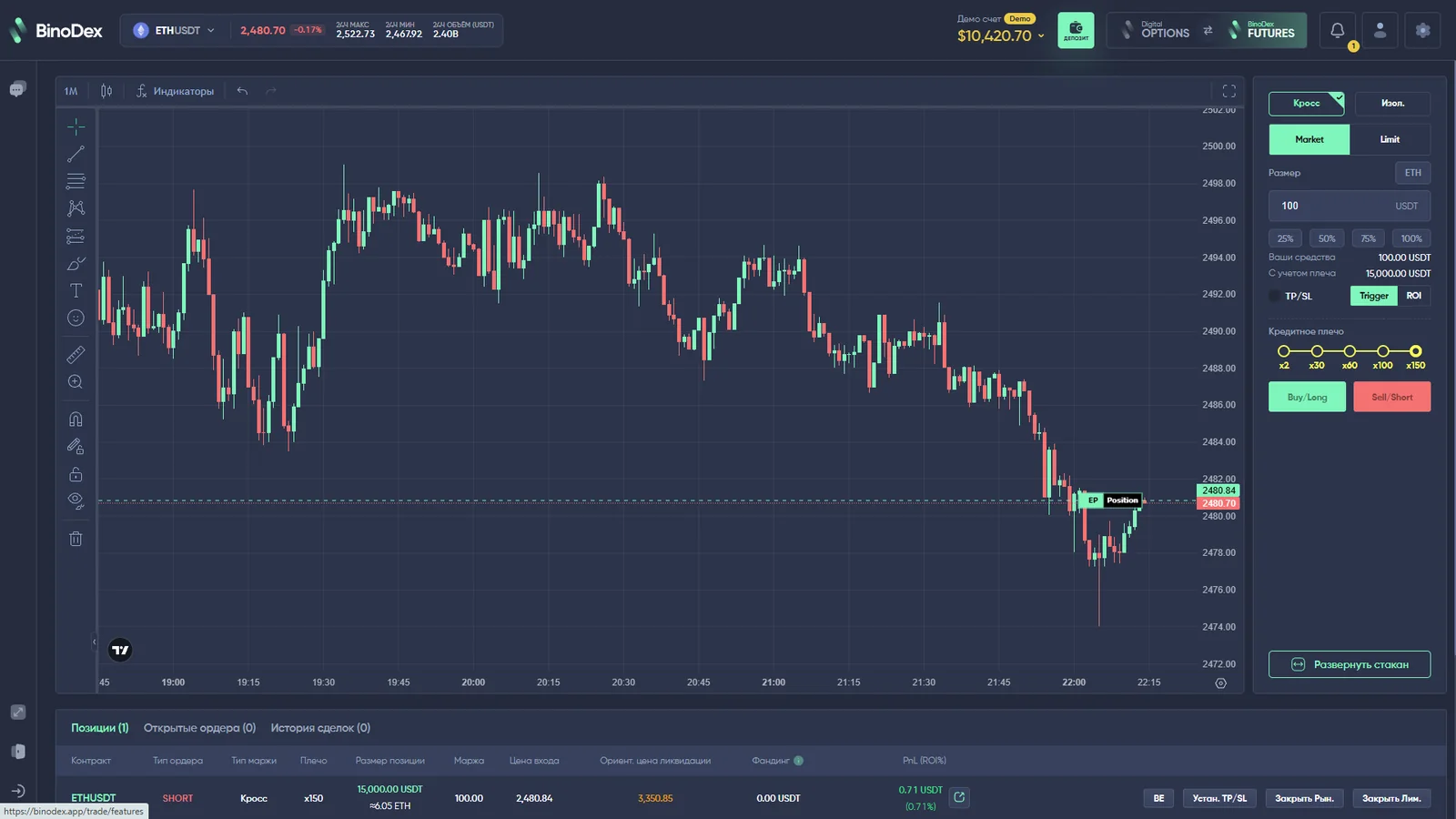
Our September 11 account check opened BinoDex AI Trading settings. The panel showed Conservative, Balanced and Aggressive trading styles, a Fixed amount or Amount range choice, and a Stop Balance field intended to define a balance threshold.
The on-screen interface warned that the bot used the real balance and showed an insufficient-funds message in the checked account. We inspected the controls but did not fund the account or activate the bot. No bot accuracy, realised return or financial protection was demonstrated.
Checklist before enabling AI Trading
Check the selected style, the amount rule, stop balance, available real funds and whether the feature is currently supported for the selected product. A conservative label does not remove trading risk; Stop Balance is not a guarantee against losses or platform errors.
BinoDex Copy Trading: Trader Lists and Copy Controls
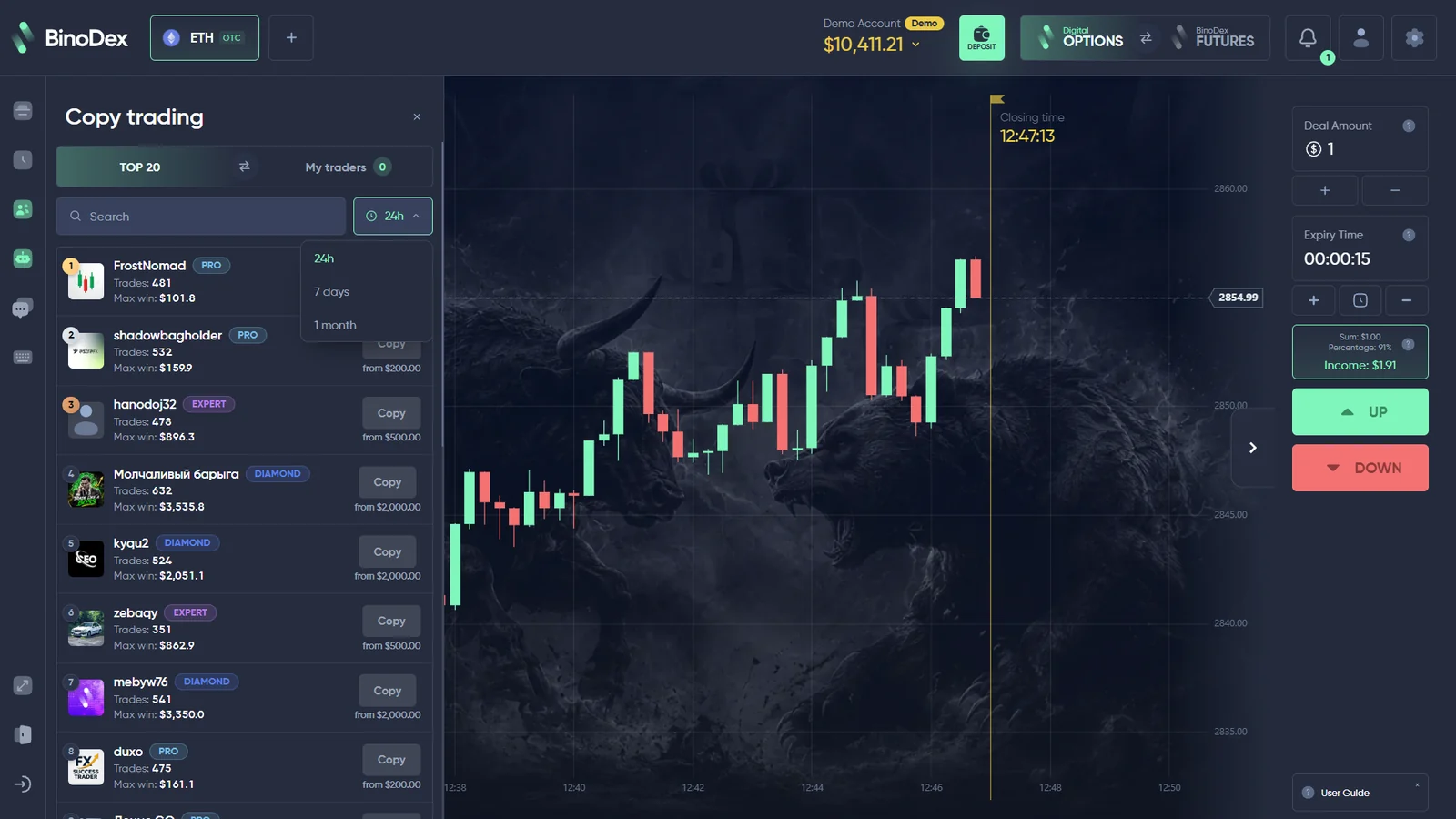
BinoDex includes a dedicated Copy Trading panel alongside its Digital Options account tools. Our September 11 capture showed a Top 20 trader list, selectable 24-hour, 7-day and one-month windows, trader cards and individual copy controls.
The interface displayed trader statistics and different funding thresholds before the copy action. Those displayed figures can change and are not audited future returns. We inspected the ranking and interface but did not fund or copy a trader, so this guide does not claim measured copy-trading results.
Before copying another account, check the displayed allocation, available funds, current conditions and the risk that another trader’s actions can lose money. Copy Trading is not the same as the self-directed expiry ticket or the AI Trading settings panel.
BinoDex Official Site Access, Registration and Login
Looking for the BinoDex official site, sign-up or login? Rating Broker is an independent trading-platform directory, not BinoDex’s operator. Our commercial buttons use a disclosed partner route to the BinoDex account entry flow. Check the final page’s secure connection and branding before entering credentials; do not use an unexpected lookalike domain.
- Open BinoDex access from this guide. Use the account button above; it is a disclosed affiliate route, not a claim that Rating Broker operates the platform.
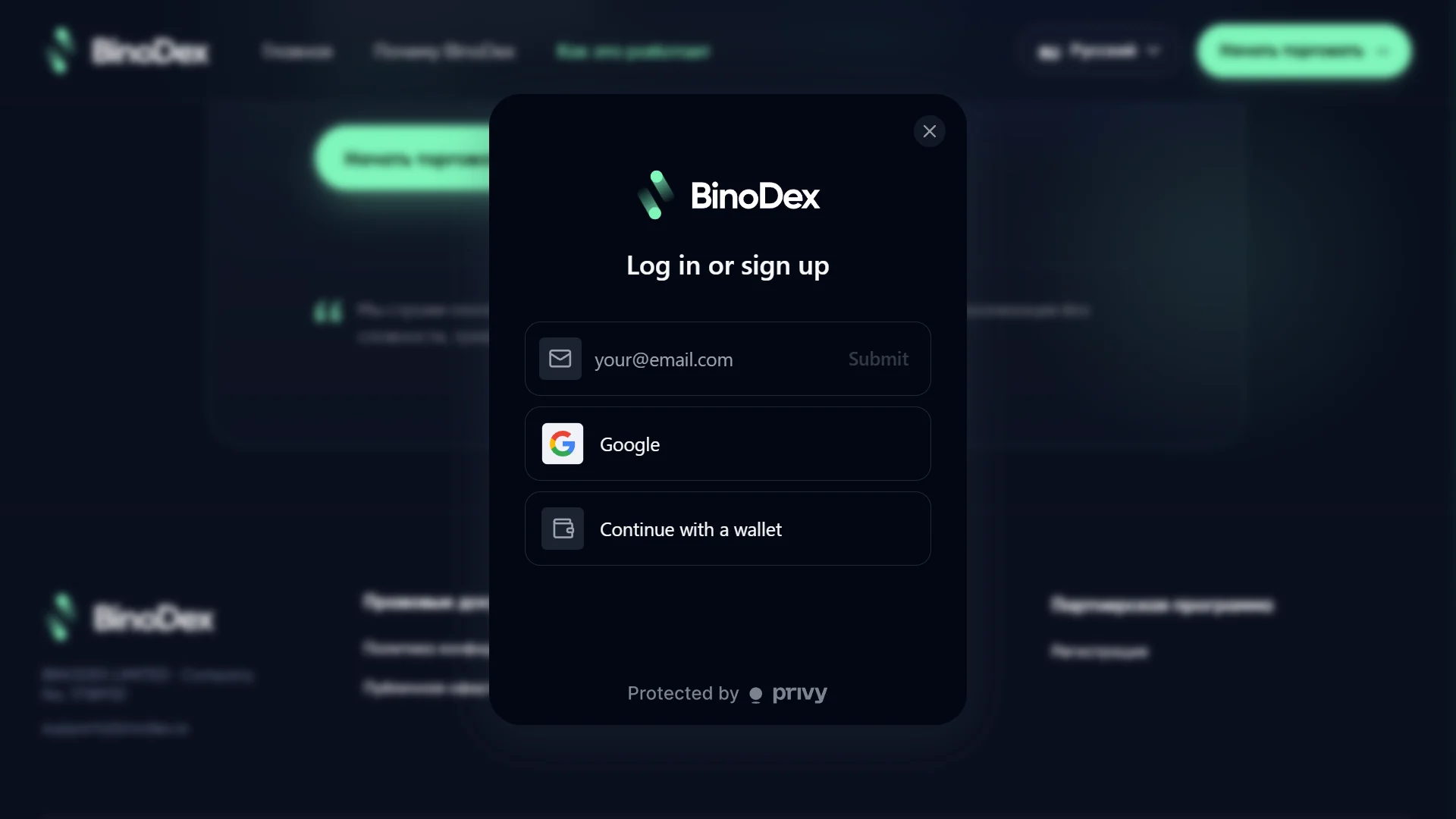
- Select a sign-up method. The captured form offered email, Google and a compatible wallet. Confirm which options appear in your region and account version.
- Complete the chosen flow. For email, follow the on-screen address and confirmation prompts. For Google or wallet access, approve only the authentication request you expect.
- Choose Digital Options or Futures. These are different trading products. Switch to demo before trying an expiry-based order.
- Review payment conditions before funding. Network, currency, provider and minimum are shown in the cashier, not fixed by this guide.
Returning user: BinoDex sign in
Use the same email, Google or wallet method associated with the existing account. If you entered through email and cannot access the account, use the available recovery or support process rather than creating a duplicate trading profile. Never send a password, recovery phrase or wallet seed to someone offering to restore access in a chat.
The supported sign-up options and page layout can change, and registration eligibility depends on the visitor’s location.
BinoDex Deposit Methods and Cashier
The cashier contains funding routes with different currencies, providers and minimum amounts. The appropriate minimum is shown for the payment method selected in the account rather than being one universal amount for every route.
One English-language account image shows a bank-card-to-crypto purchase form with a USDC amount field. This is an example of the payment interface and how the purchase route is presented.
Inside the cashier, select the payment currency and method, check the on-screen instructions, and use the displayed amount requirements for that route.
See account payment options. Open the BinoDex account to view the currently available deposit methods.
Open BinoDex account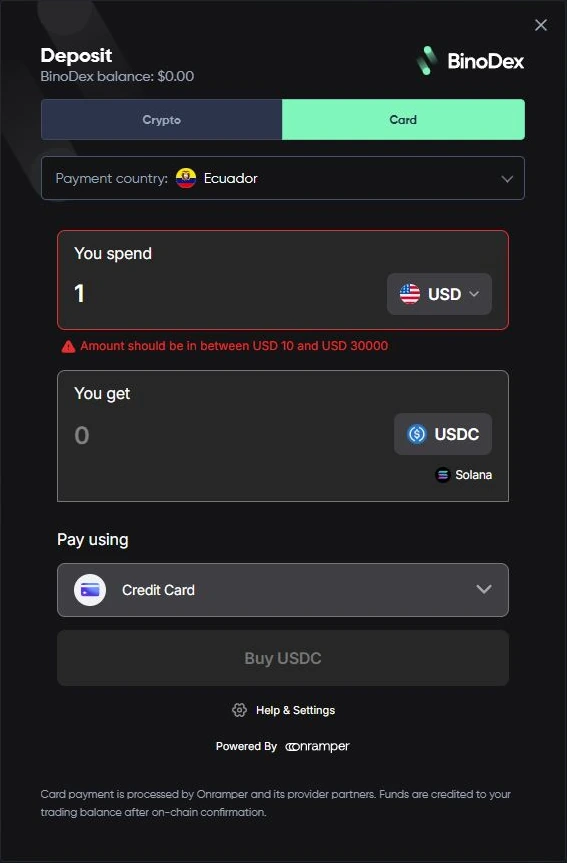
BinoDex USDT Deposits: Solana, Tron and Network Fees
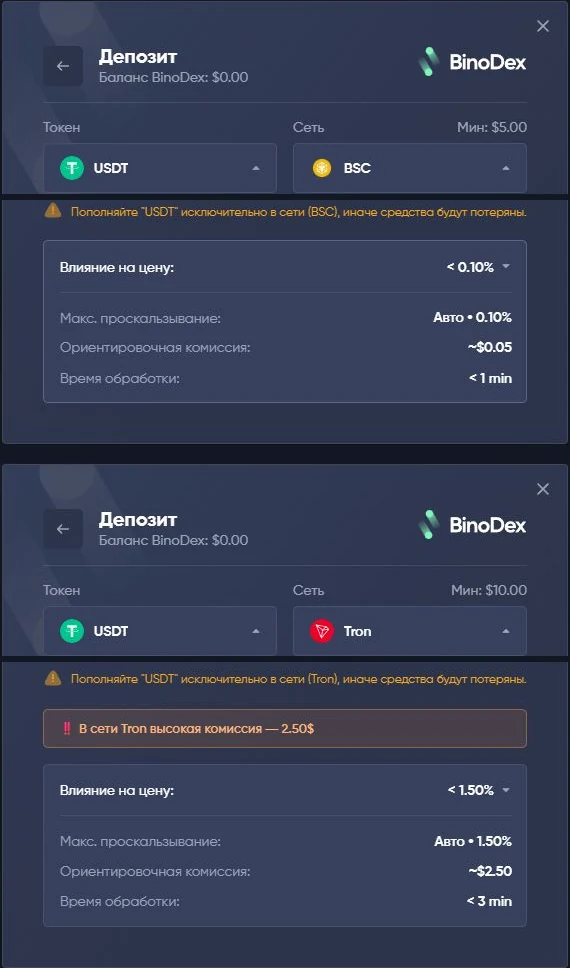
The checked cashier exposed token and network selections before a transfer. A $5 deposit message must not be treated as a universal minimum across cards, tokens and blockchain networks.
| Token and network | Minimum shown | Estimated network cost |
|---|---|---|
| USDT / Solana | $5 | About $0.10 |
| USDT / BSC | $5 | About $0.05 |
| USDT / Tron | $10 | About $2.50 |
| USDC / Base | $5 | About $0.05 |
| Card / on-ramp example | $10 | Provider quote varies |
Token names alone do not tell you the current cost. Re-check token, blockchain, wallet destination, provider quote, displayed minimum and estimated commission before sending anything. Using a different network can result in lost funds. No real crypto transfer was completed in the captured checks.
BinoDex Withdrawals, Processing Claims and Account Checks
The BinoDex public site markets fast withdrawals, no KYC and zero trading fees. These are operator claims, not measured results from our check. We opened the account, used demo trading and inspected funding routes, but did not deposit real money or complete a withdrawal.
The published AML/KYC terms mean that a funded transaction or account review may still require identity information. Network commissions, payment-provider quotes and conversion costs may apply even where an operator advertises no platform trading fee. A no-KYC headline is not a guarantee that a withdrawal will never be reviewed.
Before making a deposit or withdrawal
Confirm the accepted token and network, current minimum, balance type, withdrawal destination and any pending verification instructions. Keep transaction hashes and withdrawal-status references if a transfer is delayed. Do not infer a one-hour or instant customer payout from an untested marketing claim.
BinoDex Android App and Mobile Browser Access
BinoDex has a trading application listed in Google Play under BINODEX LIMITED; the Google Play listing identifies the application. The Android listing describes account access, demo and Futures-related functionality. Availability can vary by country and device.
Our documented browser account exposes Digital Options, Futures, balances and cashier controls. The Apple listing seen in the project research was for a crypto-news product, not independent confirmation of a full iPhone trading app. Therefore we do not promise an equivalent native iOS terminal.
On mobile, check which product mode is selected, whether the balance is demo or real and whether the payment dialog has fully loaded. Never install an unofficial APK or provide wallet seed phrases to a support impersonator.
Where BinoDex Account Access Is Restricted
BinoDex’s published restrictions list residents of the European Economic Area, United Kingdom, United States, Canada, Australia, Japan, Israel and United Arab Emirates, as well as other jurisdictions where the products are restricted. These are the operator’s published access conditions, not a universal legal determination.
Visitors should check their own residency, applicable rules and eligibility before registering or funding. A working affiliate link or available login screen does not establish that real-money trading is offered lawfully in every country.
BinoDex Account Features Compared
These areas are distinct. Use the account interface to confirm which product and balance are active before following a tool or funding prompt.
| Area | What we observed | Important limit |
|---|---|---|
| Digital Options | Asset, deal amount, expiry, payout, Up/Down | Terms and payout change by ticket |
| Demo | $10,000 virtual account and completed trade | Not proof of real-money execution |
| Futures | Market/Limit, margin, leverage, Long/Short, TP/SL | Liquidation and funding risks |
| AI Trading | Styles, amount rules and Stop Balance | Real-balance tool; not activated in test |
| Copy Trading | Trader list, time windows, copy controls | No funded copy trade tested |
| Deposits | Crypto token and network options; card quote | Method-specific minimums and costs |
| Withdrawals | Account cashier access | Real payout not tested |
| Android | Google Play trading app listing | Check device and regional availability |
BinoDex Affiliate Program: BinoPartner
BinoPartner is the separate partner program associated with BinoDex. It is intended for publishers and traffic partners rather than traders opening an individual Digital Options or Futures account.
Details of the available partnership arrangements, commission models and partner tools are covered on our BinoPartner affiliate program page. Trading registration and affiliate registration are distinct account purposes.
For additional trading-platform profiles, return to the Trading Platform Directory.
BinoDex FAQ: Official Access, Demo, AI, Copy Trading and Payments
Is Rating Broker the BinoDex official site?
No. Rating Broker is an independent publisher. Our BinoDex account buttons are disclosed affiliate links; verify the secure BinoDex account screen before entering personal information.
How can I sign up for BinoDex?
Open the BinoDex account route, check the branding and choose a supported method. The September form offered email, Google and compatible wallet access; options can differ by account or location.
Where is BinoDex login?
Use the account sign-in flow and the original email, Google or wallet method. If email access fails, use the recovery process on the verified account page.
Does BinoDex have a $10,000 demo account?
Our September 4, 2026 logged-in session displayed $10,000 in virtual funds. This is dated account evidence, not a promise that every new demo will always show the same balance.
Can I try BinoDex without depositing real funds?
The demo in our test used virtual funds. We verified access after signing in; an unregistered guest demo was not established by this test.
What is the minimum BinoDex trade?
BinoDex markets Digital Options trades from $1. The active order ticket is the place to confirm the currently accepted amount and expiry.
What is the minimum BinoDex deposit?
Minimums vary by token, blockchain and provider. Our September cashier showed $5 for USDT/Solana and $10 for USDT/Tron; a card route also began at $10 in the checked session.
Does BinoDex offer Futures?
Yes. We observed a separate perpetual Futures workspace with Long/Short, Market/Limit, Cross/Isolated, leverage and TP/SL controls.
Does BinoDex offer AI Trading?
The observed AI Trading panel offered Conservative, Balanced and Aggressive modes plus amount rules and Stop Balance. It referred to the real balance; we did not activate it.
How does BinoDex Copy Trading work?
The inspected Copy Trading panel listed traders and time filters with copy controls and thresholds. We did not fund or copy a trader, so no realised performance is claimed.
Can BinoDex withdraw funds instantly?
The operator markets fast withdrawals, but our account checks did not include a real-money withdrawal. We cannot independently confirm a typical payout time.
Does BinoDex require KYC documents?
The demo and pre-payment checks did not require documents. However, BinoDex publishes AML/KYC terms, so we cannot guarantee that funded accounts or withdrawals avoid verification.
Which countries are restricted by BinoDex?
The operator lists the EEA, UK, US, Canada, Australia, Japan, Israel and UAE among restricted jurisdictions. Account availability must be verified for a visitor’s residency.
Is there a BinoDex affiliate program?
Yes. BinoPartner is covered separately in our BinoPartner affiliate-program profile; trading and affiliate registrations have different purposes.
BinoDex Digital Options, Futures and Account Access
BinoDex combines an expiry-based Digital Options interface with separate Futures trading tools. Demo mode, market selection, payments and mobile access are available through the account ecosystem.
Trading products involve financial risk. Read the Risk Disclosure and Affiliate Disclosure.
Trading products involve financial risk, including the possible loss of deposited funds. Product and payment availability depend on location and current provider terms. Risk disclosure · Affiliate disclosure