
Quotex Broker: Demo, Trading Platform & Account Features
Find the Quotex official website at qxbroker.com, understand sign-up and login, and compare demo access, trading controls and withdrawal terms before funding an account. Rating Broker is independent of the operator.
Start with official access, then explore the demo terminal
Quotex uses qxbroker.com for its public sign-in and registration pages. A browser demo is advertised without registration; creating an account adds personal settings and access to funded-account functions where available.
Explore the key features ↘- 01Check the official domain
Look for qxbroker.com in the final destination and confirm country availability.
- 02Try the demo first
Inspect the asset, amount, expiry and displayed payout without depositing.
- 03Register only when eligible
Use your real country, account currency and working email when you decide to sign up.
Quotex Broker Account Overview
Official access: the public Quotex trading website is qxbroker.com, with English sign-up and sign-in sections. This Rating Broker profile is an independent reference, not the broker's official website. Sponsored account-opening buttons on this page use a tracking link; check the final domain and the terms before submitting personal details.
For a first visit, distinguish three tasks: opening a no-registration browser demo, creating a personal account with accurate details, and using the live cashier only after checking eligibility and payment limits. You do not need to deposit in order to study the demo order ticket.
The current public materials describe a $10,000 virtual demo balance, a deposit entry from $10, and trade sizes from $1. These are separate values, not a promise that every payment method or asset supports the same amount. Platform rules, regional availability and displayed payouts can change.
Public terms and registration fields checked 15 October 2026. Real-money withdrawals and KYC completion were not tested for this directory profile.
Quotex Trading Platform and Terminal
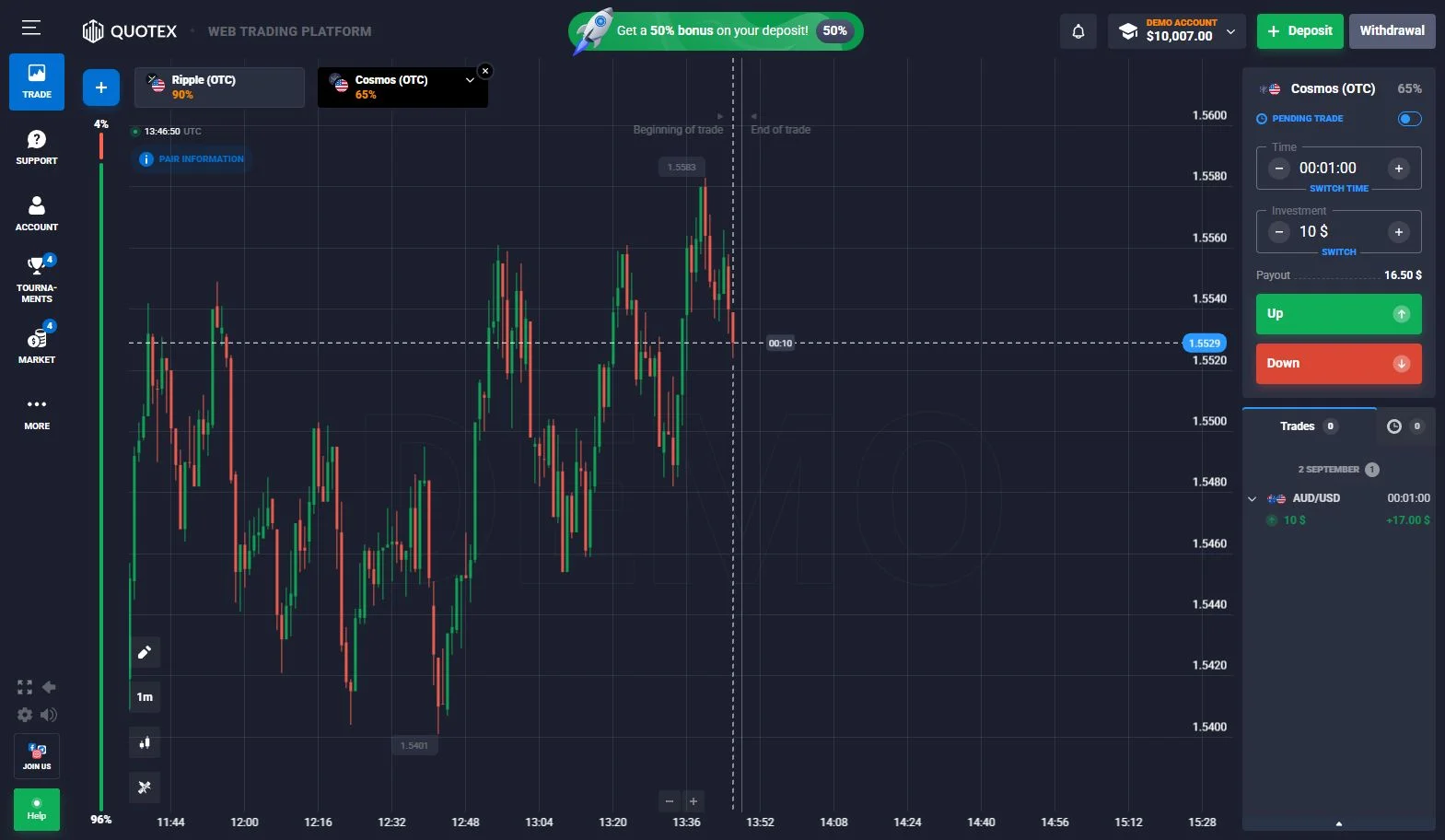
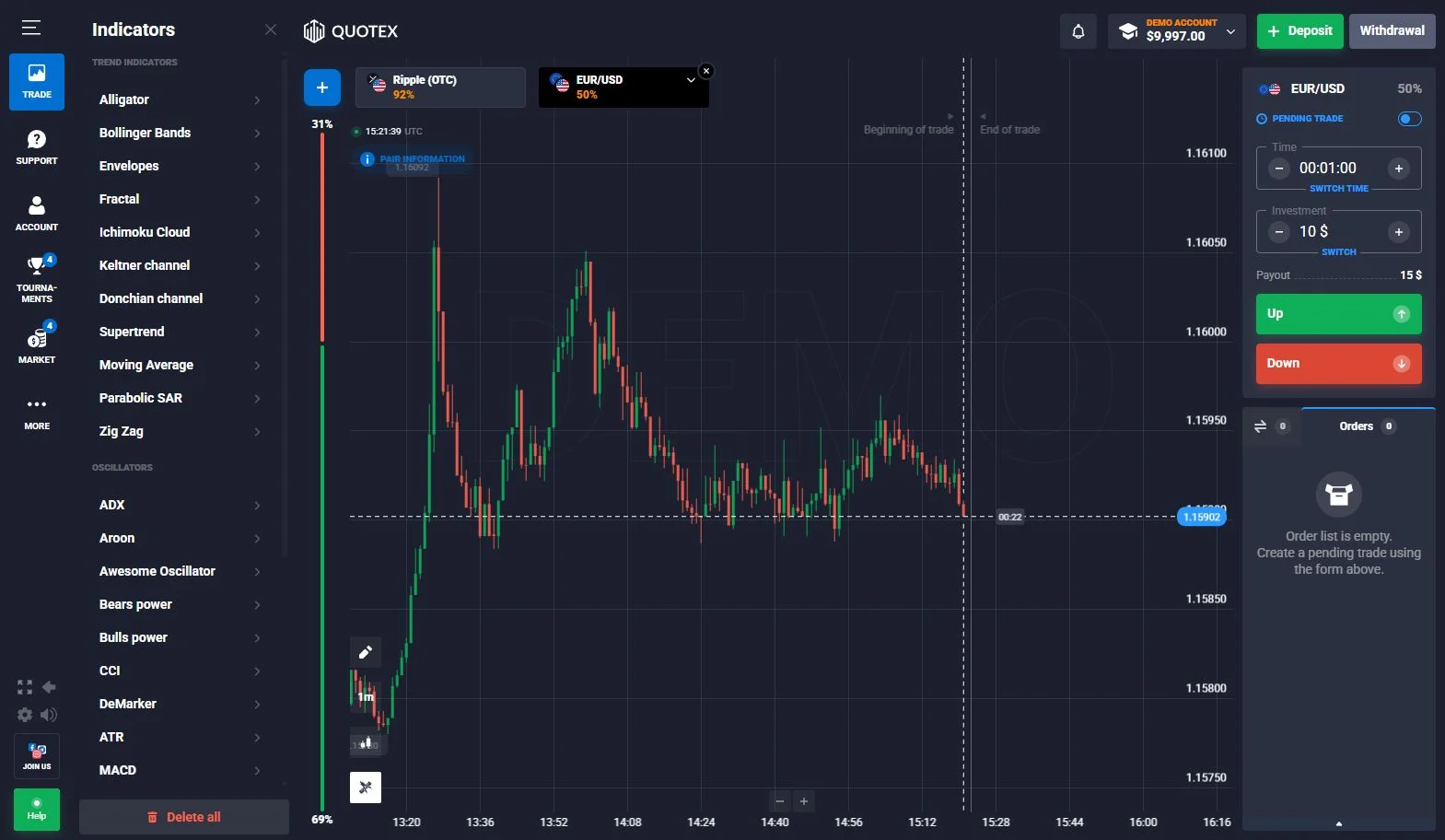
The Quotex interface places the price chart at the centre of the workspace. The contract ticket groups the important order fields: amount, time and trade direction. The header and adjacent menus provide access to account status, available instruments, drawing tools, indicators and activity history.
An English desktop capture from September 2026 shows a working Quotex demo terminal. The screenshot is a real archived platform image from the same publisher’s source materials, not a rendered or reconstructed trading screen. It demonstrates the layout of the chart and controls; the current interface may look different.
A practical way to inspect the platform is to start with the instrument menu, open the expiry selector and then return to the trade ticket. The displayed percentage belongs to the chosen asset and session. It is not a universal account yield or a guaranteed result.
Chart and order controls
The chart provides an instrument view while the order ticket controls the parameters of an individual contract. Users can inspect price history, choose a chart style and open technical tools before entering an amount. The outcome of an expiry-based contract depends on its terms and the instrument movement at expiration; the on-screen payout is a quoted contract parameter.
For clarity, account balance, current payout, completed-trade history and deposit controls should be read as different functions. An amount shown in a demo balance is virtual, whereas funding a real account uses the payment cashier.
Quotex Demo Account and Virtual Trading
Yes — Quotex advertises a free demo that can be tried without registration. The official public website offers a guest-style practice entry; it is designed for inspecting the trading screen without first creating a funded account. Separately, the registration route offers a personal profile and additional account functions.
Demo without registration
Open the official site, choose the demo entry and inspect the asset chart, stake, expiry and Up/Down ticket. Availability and the exact entry screen can vary by device and residence.
Demo with an account
Complete registration with a valid email, then open the platform's practice mode. This is the appropriate route when you also need to explore account menus and profile settings.
The published demo balance is $10,000 in virtual funds. Recorded trade history illustrates how the interface displays completed practice orders; neither a virtual win nor a demo balance can be withdrawn. Demo execution also cannot establish real-money payout or withdrawal performance.
Explore Quotex DemoOpen the Quotex account entry page to access the available practice and trading modes.
Open Quotex demo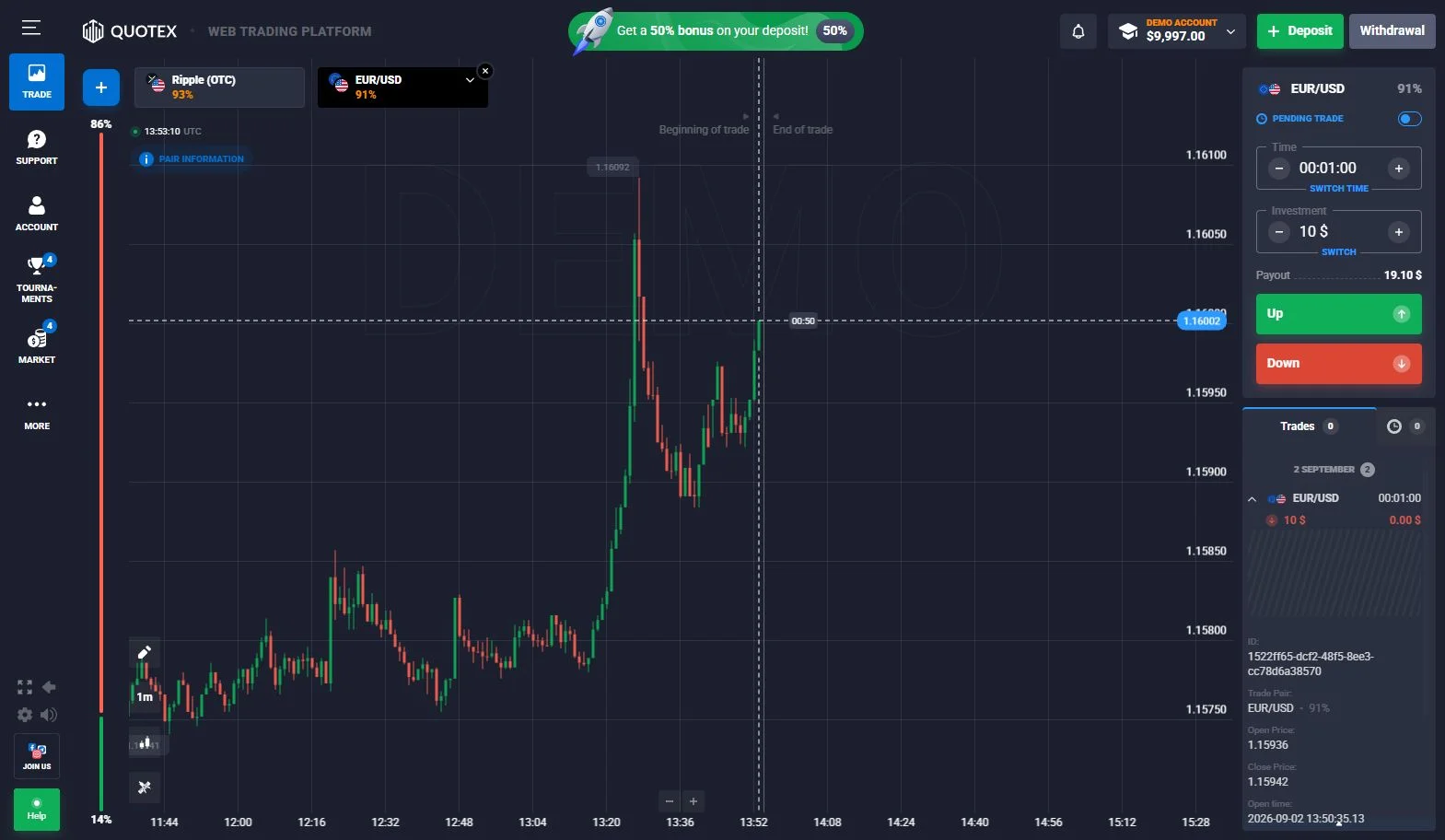
Quotex Assets, OTC and Displayed Payouts
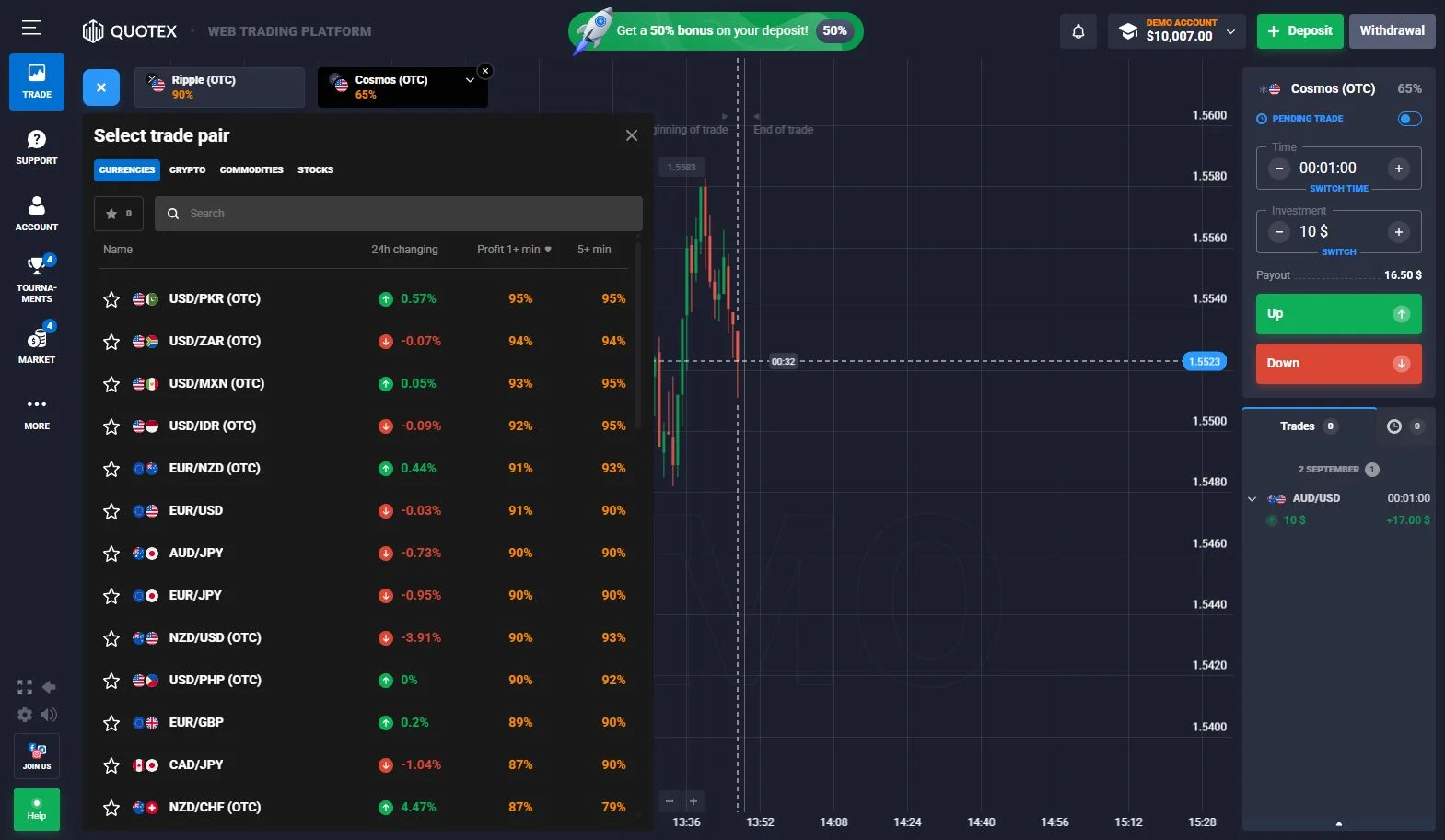
The asset selector presents multiple categories, including currency pairs, cryptocurrencies, commodities and stocks in the captured version of the platform. The available list changes with market hours, session status and the instruments enabled for a specific account.
Some instruments use an OTC label. That label identifies the broker’s platform session and should not be confused with the live underlying exchange market. Before setting an order, review the actual instrument name and the corresponding ticket displayed in the terminal.
The interface also shows different return percentages next to individual assets. A percentage quoted for one instrument in one saved session is not a permanent rate for the entire platform. For that reason, this directory does not advertise a single maximum payout as if it applied to all trades.
Quotex Expiry Times, Trade Amount and Contract Setup
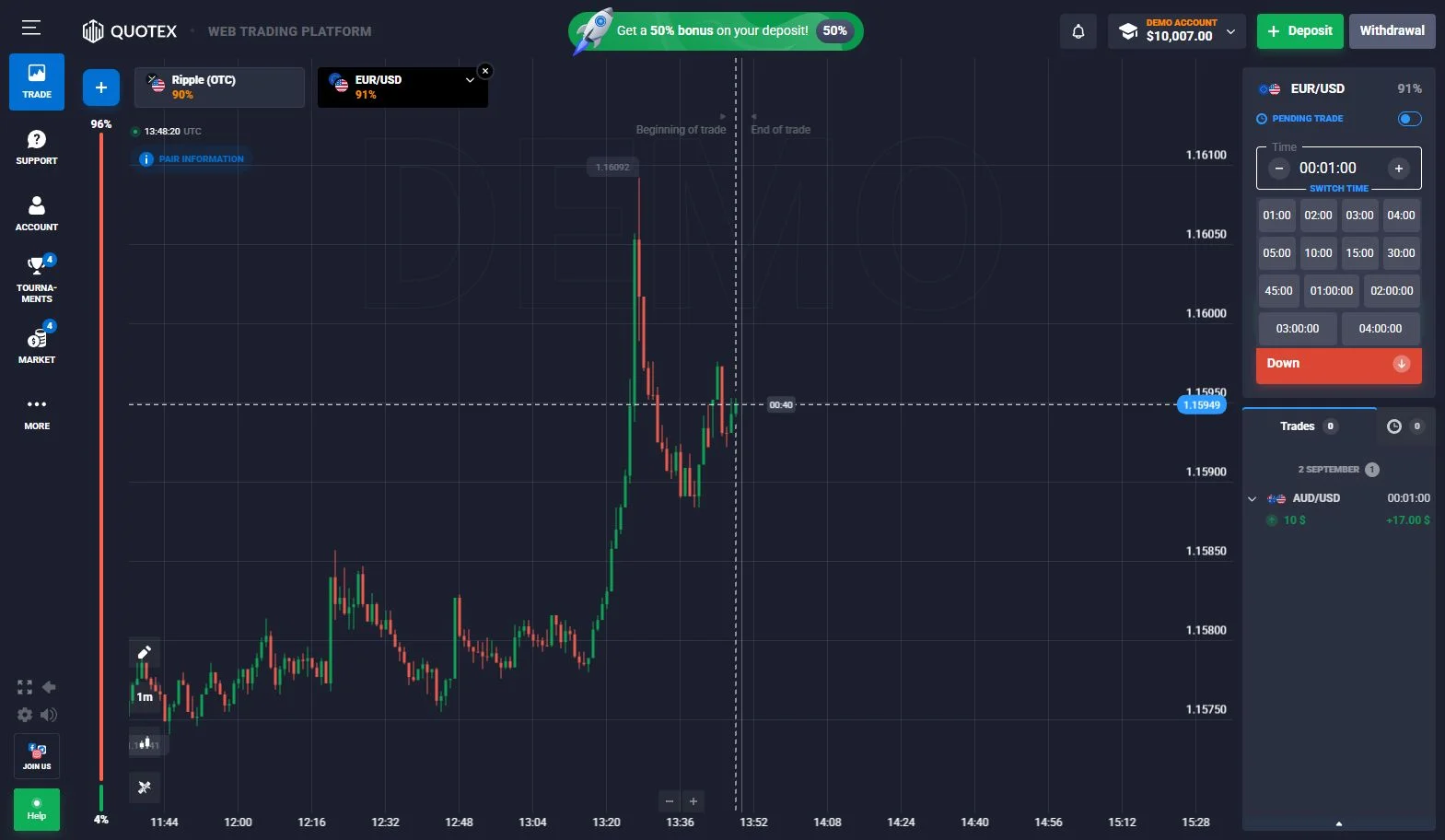
In the Quotex order panel, the time selector and amount field sit near the directional trade buttons. The user chooses an available asset and then selects a contract duration offered for that asset. The amount field determines the stake on the contract, while the displayed payout describes the profit paid if the outcome meets the contract’s conditions.
The original English expiry-control image shows short and longer duration choices. Exact durations depend on the selected instrument and current trading mode, so an old screenshot should be used to understand the location of the controls rather than as a promise of permanent availability.
Quotex publicly advertises starting trade amounts from $1. This is an entry-point figure, not a requirement to choose the minimum. Before confirming a live-money trade, review the asset, duration, payout and amount together.
Quotex Indicators, Drawing Tools and Chart Options
The Quotex terminal contains a technical-indicator menu in addition to its basic price chart. The account source material shows familiar tools such as Moving Average, Bollinger Bands, MACD, RSI-related momentum tools and other built-in chart studies. These can help organise the chart without requiring a separate analysis service.
Chart indicators belong to the trading workspace, not to account registration or the payment cashier. An indicator can be configured or removed while the user remains on the selected instrument. The platform may change the number of supported indicators and their interface between releases.
Indicators display calculations based on price information. They do not change the payout formula of a fixed-outcome trade or establish a reliable profit expectation. On this page, the purpose of the screenshots is to show where chart tools are located.
Quotex Official Site, Registration and Login
The Quotex official site is qxbroker.com. Rating Broker is an independent comparison directory. Its commercial button is a sponsored route and should not be mistaken for the operator's domain. Before entering credentials, check the final destination in the browser address bar and confirm that your country can use the service.
How to register for Quotex
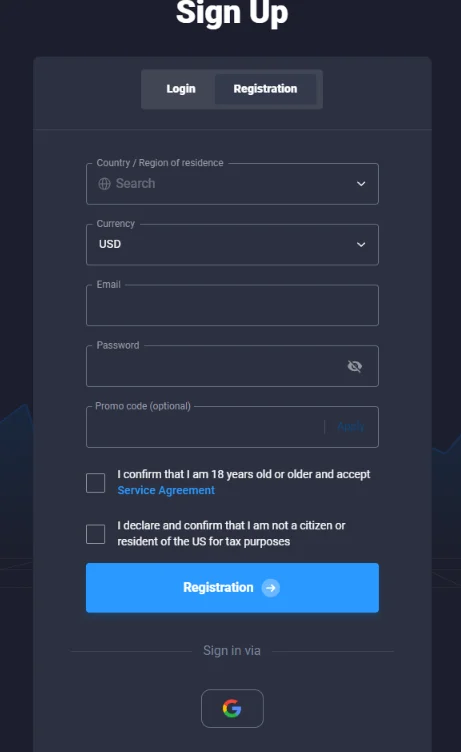
- Open the sign-up form. Choose the registration tab rather than the sign-in tab.
- Select country or region of residence. Enter accurate information; some regions are excluded from service.
- Choose an account currency. Check this before confirming, because payment methods and conversion may depend on the currency.
- Enter a working email and a password. The official form warns that changing the registered email later may not be possible and that an invalid address can prevent withdrawal.
- Review optional promo-code and consent fields. A promo code is not necessary to complete the standard form. Confirm age and eligibility statements only if accurate.
- Complete registration, then choose demo before funding. Explore the available terminal and read payment conditions for your account.
Quotex login, sign in and password recovery
Existing account holders use the Login / Sign in tab, not a second registration. Enter the email linked to the original account and your password. If the password is forgotten, use the form's Forgot your password? recovery link and follow the email instructions. Avoid creating another profile as a workaround for an access issue.
Country limitations: the current QxBroker registration page names the United States, Canada, Hong Kong, EEA countries, Israel and Russia among excluded areas; users under 18 are also excluded. Eligibility must be checked on the current operator page, not inferred from a language menu or an affiliate redirect.
Source: public QxBroker registration and login interface, checked 15 October 2026. Account approval and geographic access were not independently tested.
Quotex Deposits, Payment Methods and Cashier
Account funding is separate from the trading terminal. The official public site advertises a starting deposit of $10, but that amount is not necessarily available for every country, currency or payment provider.
- Sign in and open the account's Deposit or cashier area.
- Review the payment methods available to your account and residence.
- Check the selected currency, its minimum amount, the receiving details and any provider fees before sending funds.
- Keep a record of the transaction and never use a payment address from an unrelated message or website.
Card, electronic-payment and cryptocurrency options can differ. The deposited amount is not the same as the minimum trade, which is separately advertised from $1. For any cryptocurrency transfer, the selected network must match the destination shown inside your actual account.
The $10 figure is the operator's public entry claim, not a verified minimum for each live cashier route.
Quotex account cashierUse the current Quotex account interface to see available deposit methods and the relevant funding instructions.
View Quotex accountQuotex Withdrawal Minimums, Processing Time and Requests
The current QxBroker FAQ publishes a minimum withdrawal starting from $10 for most payment systems and from $50 for cryptocurrency withdrawals. Certain assets, including Bitcoin, may require more. These are published starting points, not a guarantee of the exact threshold visible in your account.
How to submit a withdrawal request
- Sign in and select the Withdrawal section of the real account.
- Check the available payout methods and any requirement to use a funding-linked method.
- Read the minimum, currency, recipient details and account-verification instructions before submission.
- Submit the request and monitor its status in the account. Processing may take longer when documents or payment-provider checks are needed.
The official FAQ describes a typical process of one to five days from the request. This is a general estimate, not a guaranteed arrival time. Demo balances and practice profits cannot be withdrawn. Payment-provider charges and any account-specific fees should be confirmed in the current cashier and terms; this page does not claim to have completed a real-money withdrawal.
Source: QxBroker public FAQ, checked October 2026. The published thresholds and times may change; a 3% repeat-withdrawal charge is not asserted here without a current primary-source confirmation.
Quotex Identity Verification and Personal Information
Quotex registration starts with account details, but identity and payment verification may be requested later. The public FAQ says additional documentation is not normally required for every withdrawal; the operator may request proof of identity or other information at its discretion to address account and anti-fraud requirements.
Use a genuine, accessible email at registration, keep the country and account details accurate and follow the instructions in the signed-in profile if verification is requested. Never assume a successful demo trade or an accepted deposit means that withdrawal verification has already been completed.
Verification was not completed independently for this directory page; exact document requests depend on the user's account.
Quotex App: Android, iPhone and Browser Access
The browser terminal is available without installing an application. For mobile access, QxBroker publishes a dedicated official installation guide covering Android, iOS, Windows and macOS. App availability and options depend on operating system version and region.
Google Play, PWA or APK
The operator describes a Google Play listing, a home-screen web app (PWA) and its own Android APK route. Confirm the developer and official destination before installing; avoid APK links from unrelated websites.
Safari and Home Screen
The published iOS instructions describe opening the official site in Safari and adding the web app to the Home Screen, with steps that vary by iOS version. An iPhone web app is not proof of a separately listed native App Store application.
The September 2026 evidence referenced on this page comes from a desktop account. It documents terminal and demo controls, not a first-hand mobile-app performance test. Test the available demo on your own device before using a funded account.
Source: QxBroker installation instructions and current Android store listing, checked October 2026.
Quotex Account and Platform Feature Table
Access reference: official web domain qxbroker.com; guest demo advertised without registration; personal account creation requires country, currency, email and password. Published withdrawals start at $10 for most routes and $50 for cryptocurrency. These values are not a substitute for the live cashier.
The table summarises the commercial account functions covered on this page. It is a feature directory, not a scorecard or a ranking of brokers.
| Area | Platform feature | Where to find it |
|---|---|---|
| Account entry | Registration, login and profile details | Account access |
| Demo account | Advertised $10,000 virtual practice balance | Demo trading mode |
| Digital options | Instrument chart, time, amount and Up/Down ticket | Trading terminal |
| Assets | Currencies, cryptocurrencies, stocks and commodities | Instrument selector |
| OTC instruments | Platform-specific OTC-labelled sessions | Asset menu |
| Chart tools | Indicators, chart settings and drawing functions | Chart toolbar |
| Deposit methods | Available currency and payment routes | Account cashier |
| Withdrawals | Payment request and destination fields | Withdrawal menu |
| Verification | Personal or payment documentation when requested | Profile settings |
| Mobile access | Browser and Android app routes | Device browser / app |
Quotex in the Trading Platform Directory
Rating Broker groups trading platforms by their account features, available products and account access. The Quotex profile describes its web-based digital-options terminal, demo trading, chart settings and cashier. Other broker profiles in the directory address their own trading products and account workflows.
A dedicated comparison of the two commonly searched brands appears in the pocket option vs quotex broker article on Best Binary Brokers. That is a separate comparison; this Quotex profile remains focused on the platform and its account features.
For other brokers, return to the Trading Platform Directory. The directory provides separate links to each brand profile, without awarding placement scores or claiming that one account is suitable for every visitor.
Open Quotex and Explore the Trading Interface
Quotex combines a familiar online registration process with a chart-led trading platform. Visitors can use the current account entry page to see how the demo and real modes are presented, which assets appear in the terminal and where the account cashier is located.
The useful sequence is simple: open the broker, inspect the registration or demo entry path, explore the asset list and order controls, and check account funding only if a real-money account is relevant. The available commercial terms depend on the account and current platform settings.
Trading carries the risk of losing funds. Quotex practice trades use virtual money. Before using a funded account, consult our Risk Disclosure and Affiliate Disclosure.
Quotex Broker FAQ
What is the Quotex trading platform?
Quotex is an online digital-options platform with an asset chart, expiry selector, order amount and direction controls in one trading interface.
Can I start with $1 trades on Quotex?
The brand advertises trading amounts starting from $1. The live ticket should be checked for the selected asset and account.
Does Quotex offer OTC assets?
The instrument selector can contain OTC-labelled options. The available sessions and assets vary over time.
Does Quotex require account verification?
The account may request personal identification or payment information through the profile or cashier workflow. Follow the current account instructions.
What is the official Quotex website?
The public QxBroker website uses qxbroker.com. Rating Broker is an independent directory, not the operator. Check the final destination URL before signing in or registering.
Can I use Quotex demo without registration?
Yes. The official website advertises browser demo access without registration. A registered account offers a separate practice route with personal account features.
How do I register for a Quotex account?
Open the sign-up form, select your country of residence and account currency, enter a valid email and password, and review the eligibility and consent fields. Promo codes are optional.
Where do I log in to Quotex?
Use the Login / Sign in tab on the official QxBroker website with the email and password linked to your existing account. The form includes a password-recovery option.
What is the Quotex minimum withdrawal?
QxBroker publishes a starting withdrawal amount of $10 for most payment systems and $50 for cryptocurrency, with higher limits possible for some assets or routes. The live cashier controls the applicable minimum.
How long does a Quotex withdrawal take?
The operator describes a usual withdrawal process of 1–5 days after a request, depending on processing volume and account checks. This is not a guaranteed arrival time.
How can I install Quotex on Android or iPhone?
Use the official QxBroker installation guide. It lists Android store, PWA and APK choices and an iPhone Safari Add to Home Screen route. Avoid unrelated APK downloads.
Is Quotex registration available in every country?
No. The official registration page lists unavailable regions including the United States, Canada, Hong Kong, EEA countries, Israel and Russia, and excludes people under 18. Check current eligibility before registration.
Quotex Demo, Platform and Account Access
Explore the Quotex chart, expiry settings, demo mode and account funding tools in one trading interface. Account features can change with the current platform version.
Some links are sponsored affiliate links. Trading involves risk.
Trading products involve financial risk, including the possible loss of deposited funds. Product and payment availability depend on location and current provider terms. Risk disclosure · Affiliate disclosure